
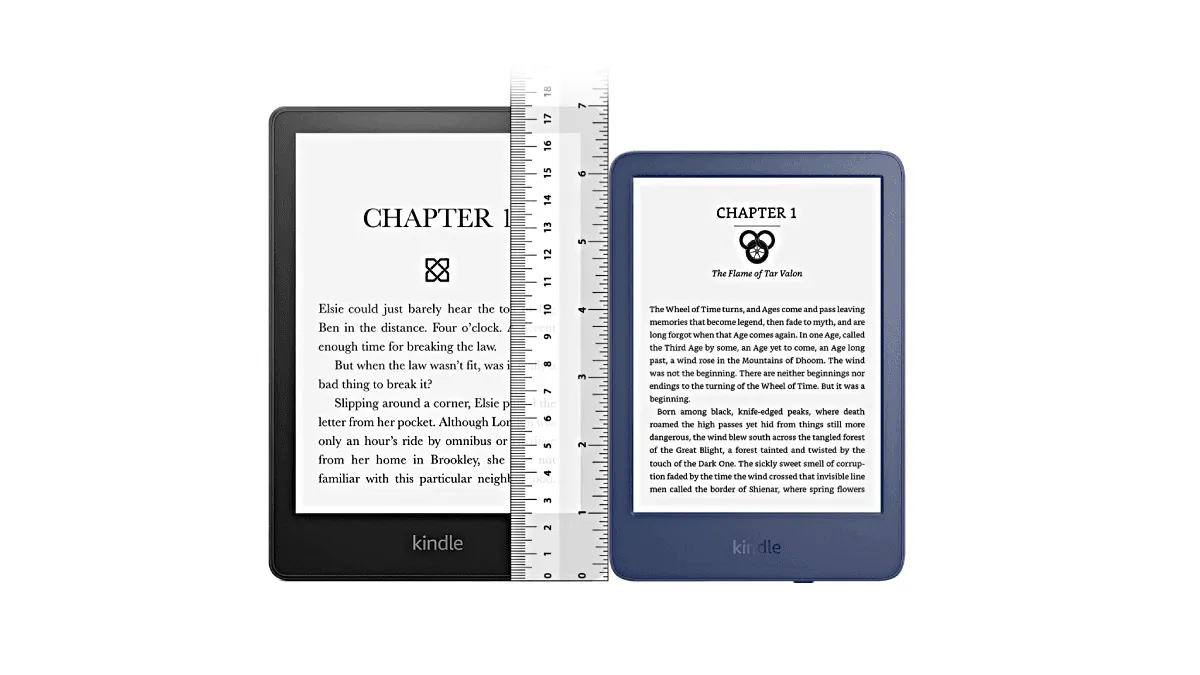
I’ve owned e-readers at every size from 6 to 10 inches. Each one taught me something different about what actually matters when you’re holding the thing for hours.
6-inch — the pocket companion
This is the Kindle Basic and Kobo Clara BW territory. Six inches sounds small until you realize it fits in a coat pocket or a small crossbody bag. I grab my 6-inch when I’m commuting on the subway or waiting in line somewhere — it’s always there, no planning required.
The current 6-inch lineup is surprisingly strong: the Kindle Basic (2024) at $109 is the cheapest way into the Kindle ecosystem. The Kobo Clara BW ($139) adds warm light and waterproofing that the Kindle Basic lacks. The PocketBook Verse Pro ($159) is the dark horse — it supports 25+ formats natively and has physical buttons, making it a genuine alternative if you’re not tied to any ecosystem.
The trade-off is text density. With a comfortable font size, you’re turning pages noticeably more often than on a 7-inch. You won’t notice it on a 20-minute bus ride, but after two hours of reading you might start to feel the rhythm is a little frantic. Also: don’t even try PDFs on this size. I did once. It was like reading through a keyhole.
7-inch — the sweet spot
This covers the Kindle Paperwhite, Kobo Libra Colour, and PocketBook Era. Seven inches is what I recommend to 90% of people. It gives you roughly 30% more text per page than a 6-inch, still weighs under 200 grams, and you can hold it one-handed in bed without your wrist complaining.
The Kindle Paperwhite (12th gen) at $159 is the default recommendation: 6.8-inch, 300 ppi, warm light, waterproof. The Kobo Libra Colour ($219) matches the screen size but adds physical page-turn buttons and a color layer — the buttons alone make one-handed reading significantly more comfortable. The Boox Page ($229) brings the same 7-inch 300 ppi panel but runs Android, appealing if you read across multiple store apps. All three are the Goldilocks devices: big enough for long reading sessions, small enough to toss in a bag.
My Paperwhite is the device I reach for at home. It’s the Goldilocks size — big enough for long reading sessions, small enough to toss in a bag. If you’re buying your first e-reader and don’t have a strong opinion about size, get a 7-inch.
8-inch — the niche upgrade
Kobo Sage and PocketBook InkPad 4 live here, plus older devices like the Boox Nova series. It’s a weird middle ground. You get noticeably more screen real estate — split-screen reading actually becomes usable — but the jump from 7 to 8 inches doesn’t transform the experience the way going from 6 to 7 does. Model selection is limited and prices jump $100+ over comparable 7-inch devices.
The Kobo Sage ($269) justifies its existence with stylus support and Dropbox integration. The PocketBook InkPad 4 ($289) has page-turn buttons, a microSD slot, and text-to-speech — features that make the extra bulk feel purposeful. Without those extras, though, an 8-inch is just a heavier 7-inch.
I’d only recommend 8-inch if you specifically want a Kobo Sage for the stylus support, or if you’ve tried a 7-inch and just want slightly more room. For most people, the 7-inch already nails it.
10-inch — the PDF machine
Kindle Scribe, Boox Tab Go 10.3, reMarkable. At this size, you’re no longer holding a reading device — you’re holding a digital notebook that also reads. Ten inches is transformative for PDFs and textbooks: you read them at full size without zooming or panning, which on smaller screens is a special kind of misery.
The Kindle Scribe ($339) is Amazon’s only note-taker, with a 10.2-inch 300 ppi screen and a basic but competent stylus experience. The reMarkable 2 ($299) strips everything back to a focused notebook — no store, no apps, just writing and PDF markup. The Boox Tab Go 10.3 ($449) is the do-everything option: Android apps, a color-optimized screen, and full note-taking capabilities.
But it’s heavy. The Scribe weighs 433g, the Tab Go 395g — you’ll prop them on a desk or a tablet stand, not hold one in your hand for a novel. I use my 10-inch exclusively at my desk for work documents and note-taking. I never take it to bed.
Weight matters more than you think
Spec sheets focus on screen size, but weight is what you actually feel after chapter three. A 6-inch Kindle Basic weighs 158g — about the weight of a smartphone. The 7-inch Paperwhite at 205g is still comfortable for one-handed reading, but you’ll start shifting hands after 45 minutes. Bump to a 10-inch Scribe at 433g and one-handed reading is no longer practical; you need two hands or a stand.
Here’s the rule of thumb I’ve settled on: under 180g disappears in your hand; 180–220g is fine but you’ll notice it; above 350g is a two-handed or desk-bound device. If you mostly read in bed holding the device above your face, weight matters dramatically — a 433g Scribe falling on your nose is an experience you only need once.
The DPI myth
You’ll see spec sheets proudly stating “300 ppi” and wonder if higher is better. Here’s the truth: virtually every modern e-reader between 6 and 8 inches uses a 300 ppi panel. There’s no variation to shop for. At 10 inches, resolution typically drops to 227 ppi — the Kindle Scribe, reMarkable, and most Boox 10-inch devices all use this density.
Does the drop to 227 ppi matter? In practice, no. You hold a 10-inch device farther from your eyes than a 6-inch one — the viewing distance roughly doubles, so the perceived sharpness is indistinguishable from 300 ppi on a smaller screen. You’d need to press your nose against a Scribe’s display to spot any pixelation on text. Where it does show up is in fine-line PDF diagrams and tiny-print footnotes scanned from print books, but for reflowable text it’s a non-issue. Don’t let DPI numbers drive your size decision.
How I’d choose today
If you read mostly on the go — 6-inch. If you read mostly at home in a chair or bed — 7-inch. If you need a notepad and read PDFs regularly — 10-inch. The 8-inch is the answer only if you already know you need it.